
01
Upload or forward
Drag PDFs into your workspace, or forward emails with attachments to your own @inbox.logipilot.ai address. Invoices, BOLs, rate confirmations, PODs, packing lists, commercial invoices.
DocAI · document intelligence
Forward or upload invoices, BOLs, rate confirmations, PODs, and packing lists. Review every field against the original page. Export to Excel or your TMS. Built for freight forwarders, brokers, and customs brokers.
No account to try it · 300 pages free when you sign up
Try it right now
A bill of lading, rate confirmation, POD, or invoice. No account, no email — the file is parsed and discarded, never stored, never used for training.
Drag a document here
PDF or photo, up to 10 MB
Three documents per visitor per day
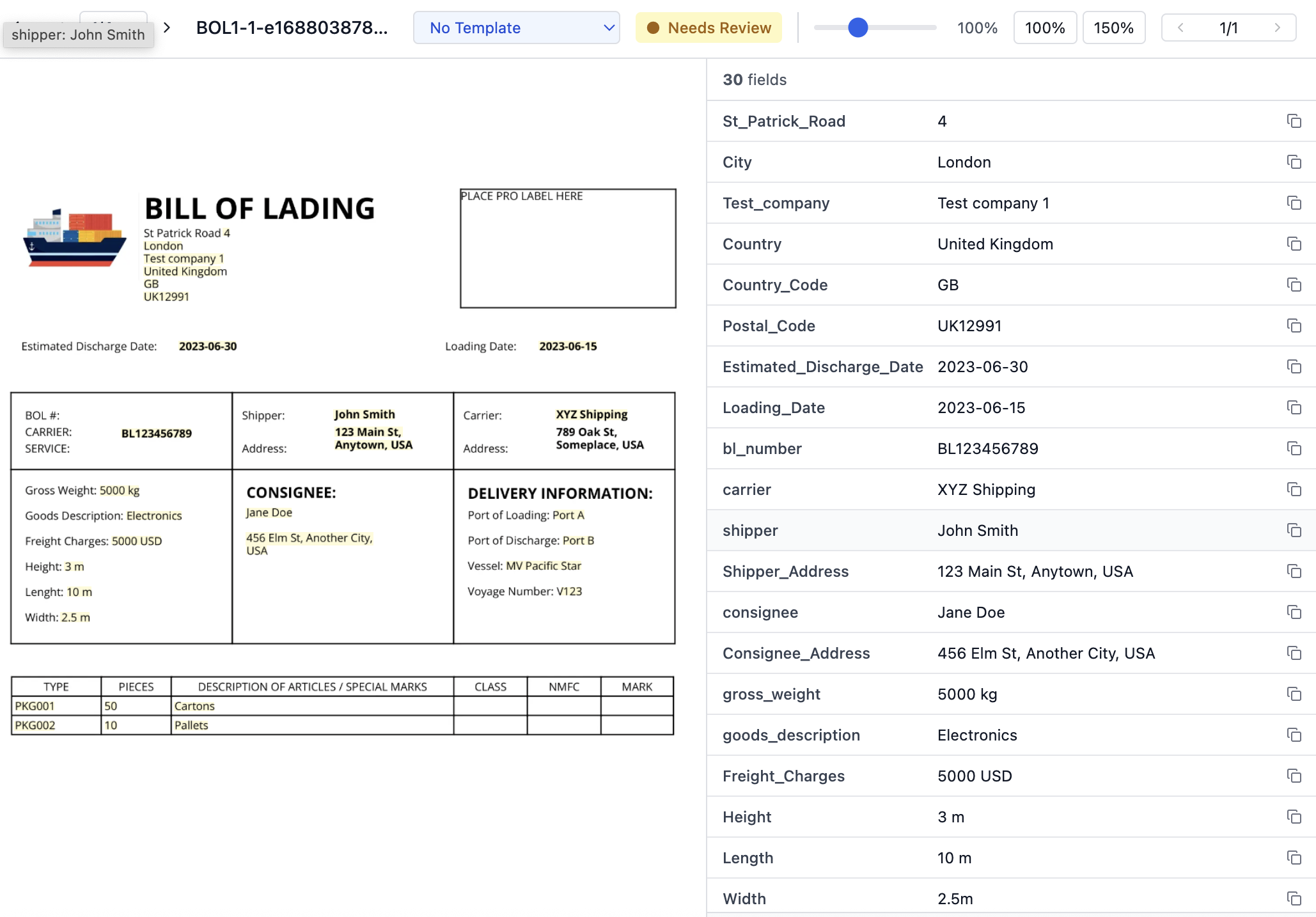
Click any field to light it up on the page. Check the low-confidence ones — this is a first pass on a document nobody trained it on, and it will have missed things.
Pulling fields off a page is where this starts, not where the money is. Once the paperwork is readable, the same system can check it — against the other documents on the load, and against what you agreed to:
None of that is possible while the numbers are trapped in a PDF. DocAI reads the inbox; a custom build runs the checks and puts a short list of exceptions in front of a person.
How it works
Drag PDFs into your workspace, or forward emails with attachments to your own @inbox.logipilot.ai address. Invoices, BOLs, rate confirmations, PODs, packing lists, commercial invoices.
A vision model returns the fields it finds — parties, references, dates, weights, line items, totals, container numbers — each with a confidence score and its location on the page.
Fields sit next to the original page; click one and the value lights up where it was read. Fix what needs fixing, approve, and export the batch to Excel or CSV shaped for your TMS or accounting system.
What you get
Every workspace gets its own inbound address. CC it, or set a rule, and documents appear parsed without anyone uploading anything.
Each field points back to the spot on the page. Low-confidence values are flagged for a person instead of passed through silently.
Decide which fields a rate con or a BOL must carry and in what order. Save a reviewed document as the template for the next hundred.
One row per document, columns named the way your TMS or QuickBooks import wants them. Excel with one sheet per document type, or CSV.
Admin, member, finance, and viewer roles; folders per customer or lane; an audit log of who approved what.
Handwritten margins, stamps, phone photos of a POD. It reads what is there and tells you how sure it is.
Pricing
Every plan includes unlimited team members, email forwarding, templates, and exports. Pages are what you pay for.
Free
300 pages · 30 days
$99
per month
$299
per month
Custom
talk to us
FAQ
DocAI is document intelligence for logistics: it reads bills of lading, rate confirmations, proofs of delivery, invoices, packing lists, and commercial invoices into structured fields, shows each field against the original page for review, and exports the result to Excel, CSV, or your TMS.
Any PDF or image (JPEG, PNG, WebP) up to 50 MB: scans, phone photos, and native PDFs. It is tuned for bills of lading, commercial invoices, packing lists, rate confirmations, proofs of delivery, and carrier invoices, and it will still extract fields from a document type it has never seen.
On real rate confirmations and BOLs it returns the visible fields with confidence scores; values above 90% are usually right, values below 70% are flagged for a person. The review page exists because no extraction is perfect — you see what it read, where, and how sure it was, before anything is exported.
Each workspace has an address like acme-freight-k7p2@inbox.logipilot.ai. Forward an email, or set a rule in Outlook or Gmail, and every PDF or image attachment lands in your Inbox folder parsed and ready to review. You can restrict which senders are accepted.
Into your workspace, stored encrypted in US cloud regions, visible only to your team. They are never used to train models shared with other customers. The try-it widget on this page is different: it parses the file in memory and discards it.
A free trial of 300 pages for 30 days. Professional is $99 a month for 1,500 pages ($0.12 per extra page); Business is $299 a month for 5,000 pages ($0.10 per extra page). One page parsed is one page counted; re-parsing counts again.
Reading is the product; checking is a build. Once documents are structured, we build the rules that compare an invoice to its rate confirmation, a POD to the BOL, or dwell times to detention terms, and put the exceptions in front of your team. See custom builds.
Start today
A workspace takes an email address to open. The first 300 pages are on us.